Showing posts with label Telecommunication. Show all posts

Tuesday, July 17, 2007

10 Features That Make Apple Iphone An Object Of Desire

By: Andrew Bermam

Gadget gurus and people passionate about style statements waited with bated breath for the unveiling of the Apple iPhone. It went on sale in the US on June 29th and phew over 700,000 phones were sold! People went sleepless, booked phones in advance and waited by their phones for the call saying “come get your Apple iPhone.” The whole world is a Buzz about the Apple iPhone.

Why is the Apple iPhone an object of desire:

1. It acts like your soul mate. You can check e-mail on the go and the mails are clearly displayed in a user friendly way.
2. The Apple iPhone enables users to check weather anywhere, keep track of sports scores, which means you never will miss a single baseball game even when on a trip.
3. It’s an entertainment center there is music for the asking as well as You Tube videos.
4. The battery lasts long and does not die quickly.
5. The Apple iPhone is user friendly which means you don’t have to check with an expert or manual to find out how to check mail or message.
6. The five-ounce device is a joy to use with its advance graphics and friendly interface. The manual is redundant for the Apple iPhone.
7. Slim, shiny and stylish the Apple iPhone has just a single button on the front that returns the user to the menu.
8. The controls are minimal just a sleep/awake switch at the top and a volume switch on the side. All other functions are “touch screen” you don’t need a stylus or pen just your finger tips.
9. The Apple iPhone can be connected to a computer with an iTunes library and the automatic sync function does the needful. It will transfer songs, videos, and movies on I Tunes along with photos, contact diary, and calendar.
10. The Apple iPhone functions like a handheld computer and can copy and store your e-mail address book and import information from your PC.

The Apple iPhone is a dream come true gadget a user can sign up for a phone service through the iTunes store. At&T standard plans can be used costing USD60, USD 80, or USD 100 a month. All plans offer unlimited email and internet use. The Apple iphone takes care of every possibility unless you swipe an unlock the iPhone will remain dormant and not get active by mistake and call random numbers and run by a bill.

When conceptualizing the iPhone Apple has puts itself in the shoes of an end user. So the Apple iPhone uses cutting edge technology, has a slick design, and friendly software so that people can actually use advance features without tearing their hair out in frustration.

The Apple iPhone is being purchased faster than Apple can reach phones to stores! It is Apple iPhone mania all the way.

Article Source: http://activeauthors.com

Tips For Buying Cell Phone

By: Roberto Sedycias

After reading several opinions I became aware of how confusing and time spending it can be the simple task of going to the mall searching for a new cell phone (telefone celular). There are so many options, brands, models, deals and services available that one can get very confused when it is time to make a choice of which is the best deal to choose from all the options available. Thinking about this problem, I decided to point out a few suggestions and I hope it can be of good use for those who want to save some time, money and find better deals.

Before deciding to buy a cell phone (telefone celular) handset it is wise to really know what your needs are and which type of service will serve you better. If you are an occasional user of a mobile phone, perhaps you may want to consider a service that offers the prepaid charges rather that the service that charges you by the month.

The prepaid choice seems to be very attractive for those on a low budget and also simply because it will give you total control of how much money you want to spend, let`s say in one month or during a certain time. This service is also known as pay as you go. It is by far the most popular plan available today. Keep in mind that with this plan, there is no contract to sign and therefore no penalties involved in case one decides to quit or use another service.

Don`t be an impulsive buyer, before you make any decisions on purchasing a brand or model, I strongly suggest you to look for the online deals available. I personally have found very attractive deals on the internet and the online deals have become very popular with most users. Carefully check the options, prices, features on each model and compare the final costs with the models available at your local shop. Keep in mind that the overhead expenses the traditional shops have are the main reason for the same product to cost much more than the similar product obtained from an online source. Always prefer payments with credit cards, which will offer more security for the online transaction.

Since there are several models and brands of cell phones (telefone celular) available in the market today, you may want to choose what seems to be most appealing to you regardless of its size, shape or design. You are the one who will be using it and you should be pleased with your choice.

Many new features and gadgets have been added to the new generation of cell phones (telefone celular). Most major brands have a variety of models that will certainly satisfy from the simpler to the most sophisticated user. The latest mobile phones have capabilities which include video calling, video recording, digital camera, mp3 player, GPS tracking system and other features. So if you don`t need any of these features, you may just want to stick to the basic and no frills type of handset which is much less expensive to purchase and much simpler to use.

This article is under GNU FDL license and can be distributed without any previous authorization from the author. However the author´s name and all the URL´s (links) mentioned in the article and biography must be kept.

Article Source: http://activeauthors.com

Cell Phone Purchase Guide

By: Roberto Sedycias

To own a cell or mobile phone (telefone celular) used to be a dream of most people not long ago. But as technology evolved and with the introduction of new players in the market, they became available with an affordable price range.

These days, cell phones (telefone celular) can be found from different manufacturers and even the cheapest of them boast features such as FM radio, camera and MMS capabilities. Amid the wide-range of models available to the customers in the market, it is often difficult to make a perfect choice.

Although design and looks of mobile phones (telefone celular) are factors that may influence one to make a purchase, the following are some important considerations that should be taken into account while buying a new device.

1 - Contrary to what most people think, it is the calling plan that is more important than the cell phone itself (telefone celular). You may get a host of attractive features with the device but unless its calling plan is suitable for you, it is not worth buying it.

One important thing about a calling plan is the regional or nationwide service coverage. Imagine if you are going to extensively use your cell phone (telefone celular) only within a particular region, then there is no point in getting a device having nationwide coverage. This can save you a substantial amount of money.

Also, choose the right cell phone plan for your calling habits. If you are the one who literally spend a fortune on their phone bills, then go for the services that offer saving schemes. Otherwise, you can opt for services that help you control your expenses on cell phones (telefone celular).

2 - Think if you really need a camera phone. How often will you be using it in your day to day life ? Besides, most online service plan providers offer a free handset with their service plan. Some even offer a cash-back on the cell phone (telefone celular) purchase. So, explore your options before buying a device.

3 - Don`t go by the look of the cell phones (telefone celular). Eventually, it becomes outdated over the times. A bulky hand-set is difficult to carry around. So pick one that fits your size.

4 - Pick a wireless carrier first then select the phone you want. Inquire your friends, relatives, and acquaintances if they are satisfied with the phone service they are using. Since, you will be using it in the same neighborhood they are the ones who can offer you the best advice on this.

5 - Online purchase is always a good idea as you can get the accurate descriptions in writing before you buy. Shopping online allows you to know the plain truth about each phone (telefone celular) and service. On the contrary, staffs of cell phone kiosks are paid on a commission basis and they always try to con the buyers into buying their phones at a higher rate. So you can never be sure about these buys.

This article is under GNU FDL license and can be distributed without any previous authorization from the author. However the author's name and all the URLs (links) mentioned in the article and biography must be kept.

Article Source: http://activeauthors.com

Monday, July 16, 2007

Bluetooth Car Handsfree HCB-700


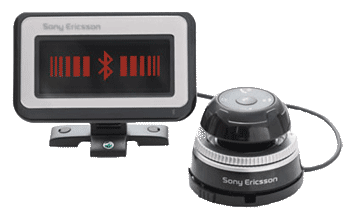
Sony Ericsson HCB-700 is a Bluetooth car handsfree set. Even though it was launched before UIQ 3 phones became available and it isn't officially listed as P990/M600/W950 accessory, it works very well and delivers great sound quality and exceptional comfort and ease of use.

The HCB-700 should be compatible with most cars on the market. It uses its own loudspeaker which makes it fully independent of the audio system of your car as it simply doesn't use it. If your car's radio has an AUX connector, you can use HCB-700's music mute cable to automatically mute music when you make or receive a call using the handsfree set.

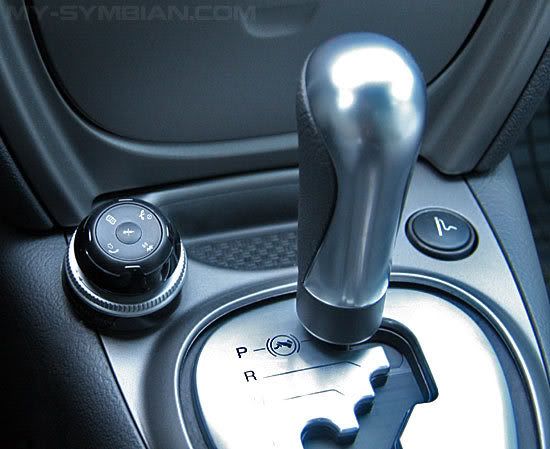
In addition to the electronic box (the main unit) and the loundspeaker which are both mounted under the dashboard and remain invisible, the HCB-700 set consists of three external parts that should be mounted in visible and easy-to-reach places: control unit, display and microphone. The display shows network status, caller ID, configuration menus and last calls lists. You can cutomize the color and contrast of the screen. The control unit works like a joystick: it consists of a selection wheel and a 5-way button on top. It is used to answer/end or reject calls, select contacts from last calls lists, configure the device, etc.

The HCB-700 is a Bluetooth handsfree, which means that the connection to your mobile phone is fully wireless. You don't even have to take the phone out of your pocket; the handsfree set finds it and establishes the connection as soon as you get into your car. It's not only comfortable to use but it also provides compatibility with most of Bluetooth enabled phones. You can get a new phone model and still use the same handsfree set without any modifications, while in case of wired handsfree sets it usually takes replacing the dedicated phone holder if not the entire device...

As mentioned earlier, the HCB-700 was released before UIQ 3 phones started shipping. Because of this, when paired with an UIQ 3 phone, the device doesn't support one important function: access to phone's Contacts directory / phonebook. It may be considered a serious disadvantage but fortunately other advanced functions can be used instead. All your most frequently dialled contacts can be invoked using voice name dialling: just press the control unit and say the voice tag (recorded in the phone) as you normally would.


You can also dial numbers using voice digit dialling: you dial the number by saying digits and signs (like Plus, Star, Hash, etc). The unit has a speaker adaptation mode that lets adapt the voice recognition engine to your voice and accent. The voice digit dialling function works extremely well and after using the speaker adaptation mode several times the recognition is 100% correct. The following languages are supported: English, German, French, Italian, Spanish, Portuguese and Swedish.

In addition to voice name dialling and voice digit dialling, the HCB-700 set also supports voice commands letting you control the device using your voice. And it's not just simple commands but sometimes even advanced dialogues: the device asks questions and waits for your answers. For example, if you want to dial a contact, the HCB-700 will ask you if you want to give a name, number or cancel dialling. Then, based on your voice answer, it'll ask you to say voice tag or say the digits of the number. Saying "Cancel" will interrupt the operation.

Sony Ericsson HCB-700 is a high quality car handsfree. The sound quality is exceptional. External screen and control unit, voice name and digit dialling, voice commands and wireless operation provide the highest level of comfort, ease of use and also security as you can stay focused on driving. The Bluetooth connection is very stable and I haven't experienced any problems.

Pro's:

* high quality sound
* wireless connection
* voice name and digit dialling, voice commands
* caller ID display, control unit
* car audio system automatic mute function
* independent of your car's audio system and thus compatible with all modern cars.

Con's:

* no access to Contacts / phonebook on UIQ 3 phones.

Evolution of Mobile Data Services

Imagine your Internet Connection and what you do on it and then imagine you mobile phone and along with your connection speed on it and you can see the potential of wireless data services.

Besides transmitting our voice, mobile devices are becoming increasingly powerful in terms of transmitting data. Mobile phones can surf the internet, stream music and videos, and download them. Anyone and everyone can go on the Internet without a fixed telephone line.

Voice and data transmission go hand in hand, as in digital frequencies data transmission sandwiched between voice transmissions. Broadband digital frequencies broadcast in eight data pipes, the data and voice transmission are split between the eight pipes.

Data transfers have since become the increasingly powerful with the ever increasing data rate speeds over the airwaves. Pretty soon, data services would have connections that are just as powerful as fixed line broadband.

Wireless data connections have since started from 2G from basic data transmission to MMS to live video updates on your mobile. Here we look at the evolution from the 2G standard to modern 3G services and beyond.

2G
Mobile data services, first developed for the GSM standard is CSD (Circuit Switch Data). Prior to CSD, mobile devices rely from modems either built on the phone or it is external, making the phone extremely unpractical. The data transfer speed has a dedicated sub-time slot which is 16Kbit/s is allocated from the base station to the transcoder, and finally another time slot 64 Kbit/s is allocated from the transcoder to the Mobile Switching Centre(MSC). CSD can deliver up to 9.6Kbit/s through a single time slot.

The next generation CSD is called HSCSD (High-Speed CSD) which provide up to four slots of speed. A 50% improvement through in throughput, due to numerous improvements of the data pipes. HSCDS is comparable to the speed of dial-up modems for fixed line networks.

Other 2G data transfer methods include GPRS (General Packet Radio Service). Often regarded as 2.5G because of its moderate data transfer rates. GPRS also boasts communication speeds of up to 115 Kbit/s a second, a vast improvement over the GSM standard of 9.6Kbit/s a second. The data transmission has similar speeds with HSCSD but it is slightly more efficient because packet switching data transmission. GRPS allows multiple users to share a transmission channel by opening the transmission for transfer only when each individual user needs it. Video streaming can still be accomplish however such continuous streams of data usually require the user to wait a bit longer for such data transactions to take place.

EDGE (Enhanced Data Evolution for GSM Evolution) was implemented to as a bolt on enhancement to GRPS networks making it for GSM carries to upgrade to it. It is a 2.75G transmission technology- EDGE can carry data speeds up to 236.8Kbit/s for 4 timeslots in packet mode. EDGE serves as a portmanteau between 2G and 3G, due to its variability and upgrades.

3G
This section covers 3G (Third Generation) data transfer services, which is considered the modern data service standard. The services associated with 3G include wide-area wireless voice telephony and broadband wireless data, all in a mobile environment. 3G data transfer in general has moderate transfer speed and lack of mobility. An increase of data speed means new communication formats, and video calls were considered the killer app for 3G. The first country that commercially introduced 3G was Japan by home-grown major telecommunications company NTT DoCoMo.

First off, we introduce both UMTS and FOMA which are based on the W-CDMA transmission protocol. W-CDMA was initially developed by NTT DoCoMo as the air interface for their 3G network FOMA. FOMA (Freedom of Mobile Multimedia Access) deployed in the 2GHz frequency band, uses packet transfer speeds ranging from 64 Kbps to 384 Kbps.

Later, W-CDMA was selected as the air interface for UMTS (Universal Mobile Telecommunication System), the 3G successor to GSM. It was also marketed as 3GSM to serve as both 3G technology and the GSM data standard it is designed to replace. UTMS supports up to 384 Kbps data transfer and has similar speed to the FOMA standard.

CDMA based EV-DO (Evolution Data Optimised) made its debut in 1999. It was developed by Qualcomm and has a data transfer of up to 600Kbps. The biggest obstacle to implementing high speed wireless networks is the lack of bandwidth. Just as only so many radio stations can be squeezed onto FM dial, only so much data can be transmitted across the available bandwidth. EVDO is an advanced CDMA technology developed by Qualcomm to deal with this limitation.

WAP
WAP (Wireless Application Protocol) is an open international communication protocol standard for applications that use wireless communication. The WAP specifications define a set a protocols in application, session, transaction, security and transport layers. Simply put, it serves as an application which allows mobile devices to access the Internet. The WAP was developed by the WAP Forum, a consortium of device manufacturers, service providers, content providers and application developers. WAP bridges the gap between the mobile world and the Internet. A WAP browser is to provide all of the basic services of a computer based web browser but simplified to operate within the restrictions of a mobile phone. WAP is now the protocol used for the majority of the world’s mobile Internet sites, known as WAP sites. The Japanese has their own wireless web protocol knows as the i-Mode system, it is also the only competing web protocol.

3.5G, Broadband and beyond
The future of mobile data transfer is referred to as 3.5G, wireless broadband and 4G.

There are a collection of mobile telephony protocols that extend and improve the performance of existing UMTS called High-Speed Packet Access (HSPA). They are high speed transmission protocols. Two standards HSPDA (High Speed Downlink Packet Access) and HSUPA (High Speed Uplink Packet Access) have been established.

HSPDA promises a data download speed of up to 14Mbps and an upload speed of up 1.8 Mbps whilst compared to current 3G network now offer 384Kbps and 63Kbps. HSPDA is 3.5, its high speed download packet is now supported in 1.8, 3.6, 7.2 and 14.4 Mbit/s.

HSUPA is yet another leap in the 3G market, which serves as 3.75G data transfer standards. Its purpose is to provide faster upload speed to the Internet. A further standard HSOPA (High Speed OFDM Packet Access) is being proposed. It is a standalone network which is not based on CDM.

Other wireless standards include WiMAX and WiBro, which serves as a stationary wireless booster for mobile devices. First off, WiMAX (Worldwide Interoperability for Microwave Access) is designed as a long range wireless broadcast. WiMAX can deliver up to several kilometres of connectivity. Some have even broken records and has the ability to broadcast up to an excess of 200 kilometres.

WiBro (Wireless Broadband) is the Korean equivalent of WiMAX. WiBro is based on the standard as WiMAX, but is designed to maintain connectivity on the go. It can maintain connection up to 60 km/h, you could drive (albeit slowly) and surf the Internet with your mobile at broadband speeds. Korean KT, SK Telecom and Hanaro Telecom were awarded licenses by the South Korean government to provide WiBro commercially. Samsung has also shown great interest in providing devices with WiBro capability.

Meanwhile the next step is 4G technology, which hopes to combine the broadband speeds, widespread coverage and mobility in mobile devices. It remains in development phase and hopes to solve several problems that are inherent within wireless connection. One of the announced 4G technologies is the UMB (Ultra Mobile Broadband) which claims to be able to provide broadband speed with full mobility. It has yet to be implemented although UMB claims to be able to provide up to 275M/bit for downstream and 75M/bit for upstream. The UMB standardisation is expected to be completed in mid 2007, with commercialisation taking place around mid-2009.

Local Telco’s Malaysian Telco’s data transmissions are in between 3G and 2G with the likes of Celcom and Maxis in the 3G arena and Digi using EDGE data services. Here we summarise the Malaysia’s the rates for our three main telcos Digi, Celcom and Maxis. For Celcom, they charge 10sen for 10kb and have staple packages for RM99 and RM120.

Meanwhile, Maxis charge 1sen per kb and half a sen for off-peak hours. While unlimited services cost around RM120. Finally, Digi EDGE data service charges 10sen/10kb and subsequently become cheaper when you spend up to RM30. After spending RM149 it becomes free.

Limitless potential
Data services has exponentially increase since its inception in 2G where we could only SMS to video calls to mobile Internet surfing. Data services have come a long way since then. However, many of us have a hard time embracing 3G, for all their advantage- perhaps there’s no practical usage for the services. The lack of mobility has also turned potential users to their Internet connections at home. Perhaps the introduction of 4G which promises mobility and high-speed might solve this practical problem.

However, the future does look bright for data services. With future wireless technologies promising better mobility and reliable speeds and connections, there is no reason why data services won’t pick up for mobile devices.

Sony Ericsson W960i


Introduction / Preview

# The Sony Ericsson W960i Walkman Phone Store more - Up to 700* albums and PC-to-phone transfer of 1GB in less than 3 minutes
# Touch and play - Navigate the latest Walkman® player with touch of a finger or stylus
# Explore more - Surf the Web via Wi-Fi™ or at 3G speed and watch videos in TV quality

Music marathon Up to 700 albums - around 8000 songs* - can be stored on the 8GB memory of the W960 Walkman® phone. Managing tracks is easy and it can transfer up to 1GB of data, including music tracks, from your PC to the phone in less than three minutes. With two stylish headsets supplied in the box „X(one of these the new Stereo Bluetooth™ Headset HBH-DS220) and a music listening time of up to 27 hours, you¡¦re free to dance much more than the night away.

Visual feast Album arts, TV shows and games. You can navigate the Sony Ericsson W960i and browse media files with the touch of a finger (or stylus). Just press the touch controls to find your way to whatever type of entertainment you need. If video is your choice, the phone supports video playback at 30 frames per second, which is the same as TV quality

Go Wireless The 2.6" touch-sensitive display is great for Web browsing. Hook up to the Web using the 3G network or a Wi-Fi™ access point. Visit your favourite pages, buy music online, and download new programmes to make the Sony Ericsson W960i truly yours.

Performance photos To catch the fun, the Sony Ericsson W960i Walkman® phone boasts a 3.2 megapixel camera within its 16mm frame. Auto focus makes your photos sharper, and with picture messaging or email you can share them instantly. Another way to spread the word ¡V or photos ¡V is to post them on your own blog site.

Sort it out As with the Sony Ericsson W910i Walkman® phone, you can organize all of your content for the W960i using Media Manager PRO, a PC programme for optimizing music, photos and videos to be used on your phone.

Wise up As with earlier Walkman® phones, the W960 incorporates TrackID™ music recognition software. This lets you record a clip of a song on your phone and find out instantly the name of the artist, track and album. Handy for those moments when you hear a song you like, but do not know who sings it.

On the Sony Ericsson W960i (and W910i) this feature has been taken to the next level. You can now receive detailed information about the song identified ¡V the background of the artists and the album. New ways to search have been added in, other than just by capturing an audio clip. If you know a bands name and not much else, for example, you can text search to find out more. Search by artist, title, album or lyrics.

Listen up The Sony Ericsson W960i Walkman® phone really is the centrepiece of your music listening life, which is why both a stereo portable handsfree and a Stereo Bluetooth™ headset for music streaming are included with the phone. When you want more, the new Street-style Portable Handsfree HPM-83 adds urban style to the W960. Its flexible neckband gives a secure fit and wraps behind the head, so as not to get in the way if you¡¦re running or at the gym. If you want to share your music library with friends, the Bluetooth™ Music Receiver MBR-100 plugs into your home stereo and lets you stream tracks directly from the phone to your stereo¡¦s speakers. Why keep it to yourself?

Nicklas Sivander, Product Manager for the Sony Ericsson W960i Walkman® phone, Sony Ericsson, sums it up: ¡§You couldn¡¦t ask for a better music mix of high performance media player and intuitive phone. The touchscreen is complemented by a regular keyboard and the phone itself is amplified by the Media Manager programme and the many music accessories. The days of taking an MP3 player, a camera and a phone with you when you leave the house are definitely over.¡¨

The Sony Ericsson W960i Walkman® phone is UMTS 2100-GSM/GPRS 900/1800/1900 and will be available in Vinyl Black from Q4 2007.

Saturday, July 14, 2007

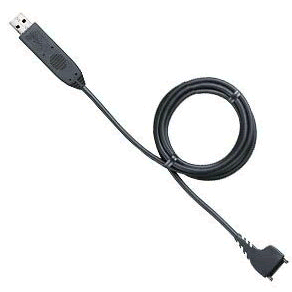
Nokia DKU-5 USB Data Cable and Unlocking cable for BB5 phones

You will need this cable to unlock some BB5 phone model using Dejan´s free software.

Driver for Nokia Data Cable DKU-5 for Windows 98SE/ME/2000/XP
Installation Guide for Nokia DKU-5 Driver

Download Link

Video Nokia BB5 Unlocking 6630 6680 6681 N70 N71 N90

About "BB5 SP Data Corrupted"

Be sure that my BB5 logger is installed properly with apropriate FBUS interface
(DKU-5) or old clasic FBUS cable connected to standard COM port.

Start loger.
Once connected phone by FBUS interface to PC, press "Read Phone" button.
If everything is ok, some data will be readed and displayed, otherwise check
your connection, phone, cables, etc.

If logger shows message "SP Data IS corrupted" than you have phone that
somebody played with it and destroyed field 308,1. So, you have to fix
that field by sending that phone to official NOKIA repair centre!!!

If everything is OK you can press "Make Log" button.
LOGER will create backup of field 308,1 and try to make LOG file.
In that proces, some time field 308,1 can be corruted which can be checked
by clicking again on "Read Phone" button.

NOW, if logger shows message "SP Data IS corrupted" than you just have
to click several times "WR Backup" and "Read Phone" to check that is your
phone is OK.

How do I unlock them?

If your phone is older BB5, then Dejan Kaljevic, a renowned GSM expert, has released software solution. His solution works for the following phones:

* Nokia 6630 RAP3G v2.10E PA
* Nokia 6680 RAP3G v2.0E PA
* Nokia 6681 RAP3G v2.0E PA
* Nokia E60 RAP3G v2.20E PA
* Nokia E65 RAP3G v2.20E PA
* Nokia E70 RAP3G v2.20E PA
* Nokia N70 RAP3G v2.20 PA
* Nokia N71 RAP3G v2.20 PA
* Nokia N90 RAP3G v2.11 PA
* Nokia N91 RAP3G v2.20E PA
* Nokia N93 RAP3GS v2.0E PA


I have one of those phones. How do I unlock it?
You need

* Phone (SIM card removed!)
* CA43 or DKU5 cable (Original Nokia with 13 pins)
* Software (http://users.net.yu/~dejan/download/bb5.zip)

Instructions

1. Connect cable to computer and phone
2. Set proper COM cable (must be, between 1 and 9)
3. Download unlocker, run `install.bat`
4. Open file c:/bb5_unlocker/logs/bb5_unlocker.cfg with a text editor set proper COM port (1-9)
5. Run c:/bb5 unlocker/BB5logunlocker.exe
6. Turn phone on. While it is turning on, click READ PHONE. You should see "DONE"
7. Click MAKE LOG, a log will be created. This log is used to generate the codes. Wait until you see "DONE".
8. Log file is in folder LOGS. Start BB5_calc.exe to make the PSW file.
9. Press button SP UNLOCK and unlock your phone.


It didn't work!

Solution courtesy to deal with on gsmhosting.com

* - Phone off,
* - Connect the cable to phone anc pc (dku5, jaf, serial)
* - Open the program
* - Power on the phone
* - When you see Nokia on the screen, immediately press on Read phone!

Afterwards use BB5 Calc and then SP Unlock

This method has always been a success.
If I power on the phone first and let it start up completely, by inserting the cable phone says enhancement not supported and making log fails.

In this case, reconnect the cable and Press Write backup.
If writing backup succeeded, Just follow the method I wrote above. Tested on many N70.

In Dejan's words:
Be sure that my BB5 logger is installed properly with apropriate FBUS interface (DKU-5) or old clasic FBUS cable connected to standard COM port.

Start loger.
Once connected phone by FBUS interface to PC, press "Read Phone" button. If everything is ok, some data will be readed and displayed, otherwise check your connection, phone, cables, etc.

If logger shows message "SP Data IS corrupted" than you have phone that somebody played with it and destroyed field 308,1. So, you have to fix that field by sending that phone to official NOKIA repair centre!!!

If everything is OK you can press "Make Log" button. LOGER will create backup of field 308,1 and try to make LOG file. In that process, sometimes field 308,1 can be corrupted which can be checked by clicking again on "Read Phone" button.

NOW, if logger shows message "SP Data IS corrupted" than you just have to click several times "WR Backup" and "Read Phone" to check that is your phone is OK.

My phone is hardlocked. What can I do?
If you have already used all 3 attempts to unlock via keypad, but you have unlock codes from your carrier, you can use the program to input the codes.

1. In "c:\bb5_unlocker\psw" create a text file "aaaaaaaaaaaaaaa_BB5.psw" where is "aaaaaaaaaaaaaaa" enter your phones IMEI
2. Then in that created file enter in "#pw+bbbbbbbbbbbbbbb+c#" where is "bbbbbbbbbbbbbbb" is the unlock codes and where is "c" enter your logs level number (1-7).
3. Save the file
4. Use "SP UNLOCK" function

Which phones are BB5?

* Nokia 3250
* Nokia 5500
* Nokia 6125
* Nokia 6126
* Nokia 6131
* Nokia 6136
* Nokia 6233
* Nokia 6234
* Nokia 6270
* Nokia 6280
* Nokia 6630
* Nokia 6680
* Nokia 6681
* Nokia 6682
* Nokia 7370
* Nokia N70
* Nokia N71
* Nokia N72
* Nokia N73
* Nokia N80
* Nokia N90
* Nokia N91
* Nokia N92
* Nokia N93
* Nokia E50
* Nokia E60
* Nokia E61
* Nokia E62
* Nokia E70

What is BB5 ?

It new platform what Nokia Mobile Phones use in new products. After review it looks similar to WD2 platform(ex. 6600). It can't work without operation system. Heart of BB5 is main procssor "RAP3G". This name is codename used by Nokia to describe very good Texas Instrument integrtaed prcosseor developed for mobile solutions. It's new technolgy OMAP 1710(up to 220 MhZ).